How Computers Actually Work
Before you can protect systems, you need to understand what a computer is actually doing. This lesson gives you a simple mental model you’ll use later in cybersecurity.
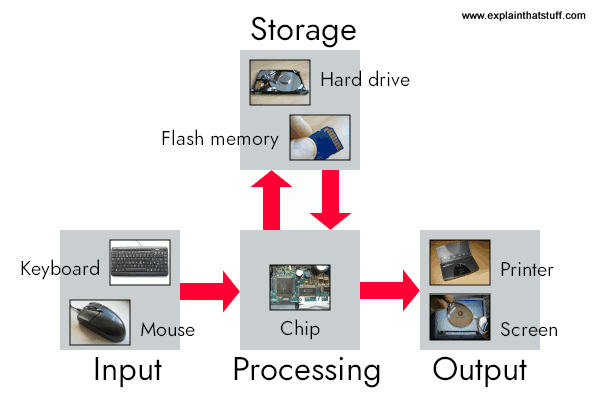
What is a computer?
A computer is a machine that takes input (keyboard, mouse, network traffic), processes data (CPU + RAM), and produces output (screen, stored files, network responses).
1CPU — The brain
The CPU executes instructions, does calculations, and makes decisions.
2RAM — Short-term memory
RAM holds data the CPU is actively using. It’s fast, temporary, and clears when power is off.
3Storage — Long-term memory
Storage (HDD/SSD) holds the OS, apps, and files permanently until deleted.
4Input & Output
Input is what goes into the system; output is what comes out (including network responses).
The Operating System (OS)
The OS (Windows/Linux/macOS) manages memory, schedules CPU tasks, controls user access, and enforces permissions.
Avoid these beginner mistakes
- Memorizing terms without understanding
- Jumping straight to tools and skipping fundamentals
- Assuming “confused” means you’re failing (it doesn’t)
Practical: “What Is a Computer?”
Scenario: You’re buying a device for a family member.
Task: Classify each item as a Computer, Input device, or Output device.
Click a category for each item
Laptop
Hint: can it run programs and process data?
Smartphone
Phones are computers in your pocket.
Printer
Ask: what does it produce?
Smart TV
Trick: “smart” devices usually run an OS.
Router
It processes data and routes traffic.
Scenario Lab: Diagnose the Stage
Goal: Practice thinking like a tech.
For each situation, choose where the problem most likely lives in the loop:
Input → Process → Output.
Pick the best stage for each scenario
“The keyboard types random characters.”
User says the letters don’t match what they press.
“The PC turns on, but the screen stays black.”
Power seems fine. No visible display.
“It freezes when I open lots of browser tabs.”
Works fine until the user does more at once.
“I try to save a file and get ‘Access denied.’”
The action is blocked by the system.
“I click Print… nothing happens.”
No paper, no errors, no job appears.
Lesson 1 Quiz
Score 75% or higher to unlock the next lesson.
What is the main role of the CPU?
Why is RAM important in cybersecurity?
Which component is most involved when ransomware encrypts files?
Phishing is best described as an attack on which part of the system?
Your Score: 0/4